• About Us
    • Mission, Vision, Values
  • Our Team
    • Leadership
    • Company Directory
  • Industries
    • Closely Held Businesses
    • Not-for-profits
    • Real Estate
      • Affordable Housing Accountants
      • Commercial Real Estate
      • Tax Credits and Incentives
        • Historic Tax Credits
        • Low-Income Housing Tax Credits
  • Services
    • Accounting Services
      • Outsourced Accounting Services
      • Bookkeeping
      • Training and Consulting
      • Accounting System Consulting
    • Assurance
      • Audit, Review, Compilation
      • Agreed-Upon Procedures
      • Employee Benefit Plans
    • Consulting Services
      • Internal Controls
      • Management Assistance
    • Tax
      • Business Tax
      • Individual Tax
      • State and Local Tax
      • Estate and Trust Planning
    • Mahoney Development Services, LLC
  • Blog
  • Resources
    • Accounting and Tax Resources
    • Real Estate Resources
    • Peer Review
  • Careers
    • DEIB
    • Community & Pro Bono Work
    • Current Openings
    • Internships
  • 651.227.6695
  • info@mahoneycpa.com
  • Client Portal
  • Remote Assistance
  • Payment
CONTACT
Mahoney CPAS logo
Facebook Twitter Linkedin

  • About Us
    • Mission, Vision, Values
  • Our Team
    • Leadership
    • Company Directory
  • Industries
    • Closely Held Businesses
    • Not-for-profits
    • Real Estate
      • Affordable Housing Accountants
      • Commercial Real Estate
      • Tax Credits and Incentives
        • Historic Tax Credits
        • Low-Income Housing Tax Credits
  • Services
    • Accounting Services
      • Outsourced Accounting Services
      • Bookkeeping
      • Training and Consulting
      • Accounting System Consulting
    • Assurance
      • Audit, Review, Compilation
      • Agreed-Upon Procedures
      • Employee Benefit Plans
    • Consulting Services
      • Internal Controls
      • Management Assistance
    • Tax
      • Business Tax
      • Individual Tax
      • State and Local Tax
      • Estate and Trust Planning
    • Mahoney Development Services, LLC
  • Blog
  • Resources
    • Accounting and Tax Resources
    • Real Estate Resources
    • Peer Review
  • Careers
    • DEIB
    • Community & Pro Bono Work
    • Current Openings
    • Internships
Quickbooks

Voiding Payments in QuickBooks Online Advanced When Using Bill.Com

By Mahoney 

Understanding the Bill.com and QuickBooks Online Advanced Integration

QuickBooks Online Advanced integrated with a bill-paying app is a great time-saving tool! Bill.com is one popular application. 

In Bill.com you enter, track approvals, and pay bills. Bills and bill payments then synchronize with QuickBooks Online Advanced. Bill.com withdraws funds from your business bank account to pay your approved bills. Your vendors receive payment from a Bill.com business bank account. 

If the vendor does not cash the check, Bill.com will email a notification that the uncashed check is approaching its 90-day expiration date. Once the expiration date arrives, Bill.com voids the payment and the bill is reinstated. You will need to re-approve a bill payment. If necessary, changes, like a new address, are allowed. Once approved, a new payment will be issued. 

It is recommended that voided payments in Bill.com are NOT synchronized in QuickBooks Online Advanced. If voided payments from Bill.com are allowed to synchronize in QuickBooks Online Advanced, the void posts on the original issue date of the payment. When Bill.com removed a payment from a prior period, the monthly reconciliations within QuickBooks Online Advanced are no longer reconciled and display an “out of balance” error.

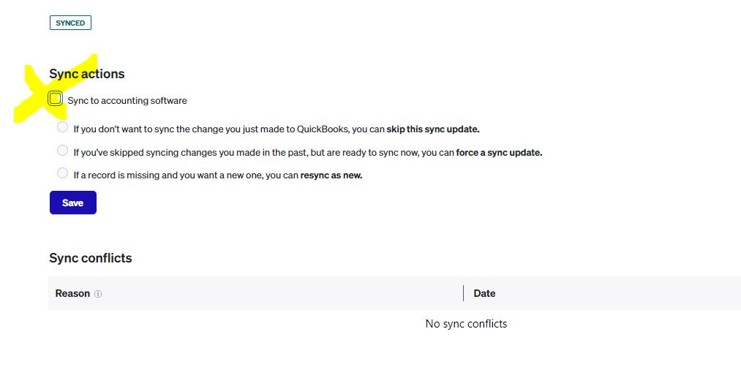
You will need to un-check a box in Bill.com to avoid synchronizing with QuickBooks Online Advanced, since they will be synchronized by default. 

In the void entry, there is a SYNC button. After you click the SYNC button, uncheck the “Sync to accounting software” box, then click the Save button. Each time you record a void payment in Bill.com, you will need to uncheck this box.

The Bill.com voided payment will post in QuickBooks Online Advanced as (1) deposit entry from Bill.com returning the voided bill payment to the bank and (2) withdrawal entry for new bill payment in the bank account. For the offset general ledger account for both the deposit and withdrawals, a clearing bank or other asset account is ideal. 

The result? The original bill and bill payment issued remains in QuickBooks Online Advanced. When the re-issued bill payment clears the bank, the original check will clear in your bank reconciliation. 

If you have any questions about QuickBooks Online or if you need help navigating Bill.com, please reach out to Associate Manager Amy Siegel, RAP for more information.

Next: Are Outstanding Checks Unclaimed Property?


Photo of a construction worker using a saw on steel in a developing building.
Could the New Markets Tax Credit Benefit your Business?
Previous Article
  • Categories

    • Accounting
    • Accounting Solutions
    • Affordable Housing
    • Assurance
    • Career
    • Employee Benefits
    • Family
    • Firm News
    • Mahoney Times
    • Not-for-profit
    • Quickbooks
    • Real Estate
    • Tax Legislation
    • Tax Strategies
    • Young Professionals


INDUSTRIES

Closely Held Businesses
Not-For-Profits
Real Estate

SERVICES

Accounting Services
Assurance
Consulting Services
Tax

ADDRESS

10 River Park Plaza, Suite 800
Saint Paul, MN 55107
(651) 227.6695
Fax: (651) 227.9796
info@mahoneycpa.com

Be the Next logo
Facebook Twitter Linkedin

© 2026 Mahoney | Privacy Policy

Mahoney Ulbrich Christiansen & Russ, PA